How to Add an Outcome Payment Rule Template (SA)

Overview
The Outcome Payment Rule Template defines which outcome codes are eligible for payment by the state government, as specified within funded training contracts. It provides transparency by clearly identifying payable outcomes and helps training providers align with state funding requirements and reporting obligations.
By establishing clear payment rules, the template supports accountability, reduces the risk of payment discrepancies or disputes, and assists in the efficient administration and allocation of public funding. It also helps ensure that claims for payment are processed accurately and consistently based on the agreed contract terms.
In this tutorial, we will guide you through the step-by-step process of creating an Outcome Payment Rule Template for the state of South Australia (SA). This setup will help ensure that eligible student outcomes are correctly identified and linked to the appropriate funding payments in accordance with SA funding requirements.

IMPORTANT: This exclusive feature is only available to Performance and Compliance Plus Package subscribers. Unlock the full potential of your learning experience with these packages. To upgrade your plan and gain access to this feature, please contact our Support Team.

Step Tutorial
 NOTE: The Contracts module must be enabled in your SMS before you can access this page. Please contact us to enable this feature, if eligible.
1. From the sidebar menu, go to Finance > Contracts > Outcome Payment Rule Templates then click New.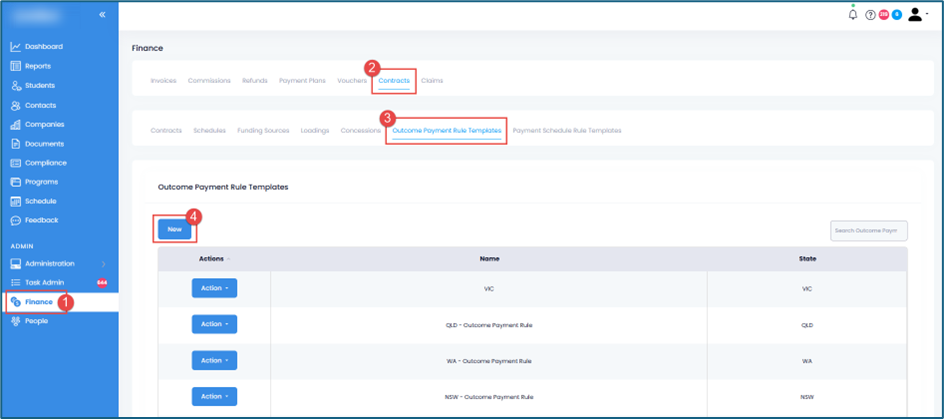
NOTE: We have several contract-related templates available for use. We recommend reviewing these templates before applying them. Any necessary modifications can also be made.
Please contact us if you would like these templates uploaded to your SMS.
2. Fill in the following:
- Name – Add a name for your template.
- State – Select the specific state for your template. In this tutorial, select SA.
State-specific Outcome Payments fields will display once a state is selected.
- Outcome Payments – Set an outcome payment for each unit of competency from the dropdown field. For SA, these are the available options: Percentage of Total, Hours Completed, and Do Not Pay.
NOTE: You can choose to exclude the unit outcome from the report by ticking Exclude from Report.Once done, click the Save button.
And that’s how to add an outcome payment rule template for the state of SA in the SMS!
Congratulations on completing this tutorial. We hope this has been helpful to you and your organisation. For any questions or concerns regarding this function, please reach out to the contact support via email.