How to Create a Payment Schedule Rule Template (ACT)

Overview
A Payment Schedule Rule Template (ACT) defines how and when payments are triggered within a system based on set conditions. These conditions may relate to enrolment, progress, completion, or other agreed milestones. The template helps standardise payment timing and ensures rules are applied consistently across students or enrolments.
It is mainly used to align payments with training delivery or service outcomes in a clear and controlled way. This reduces manual handling and helps ensure payments are processed accurately according to ACT requirements, while supporting compliance and reporting needs.

Step Tutorial
1. From the Dashboard, head to Finance, then Contracts, then Payment Schedule Rule Templates. Click the New button.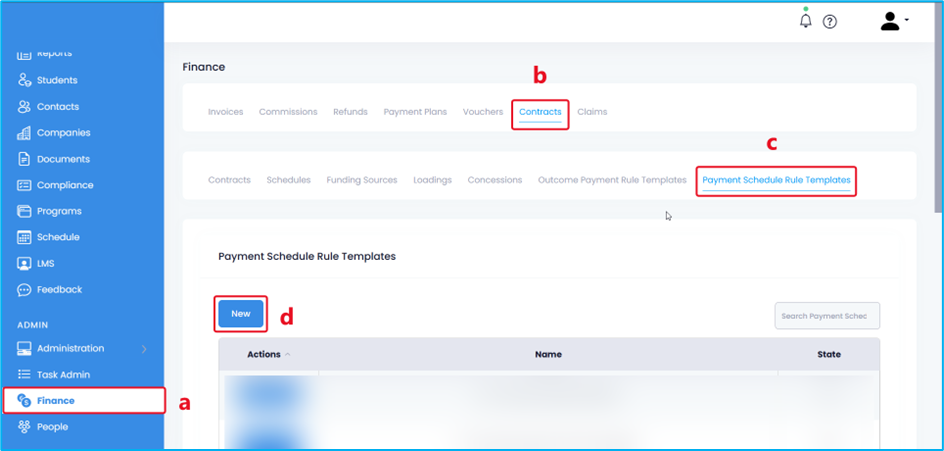
2. Add the template name and state — ACT, then click the Add Payment button.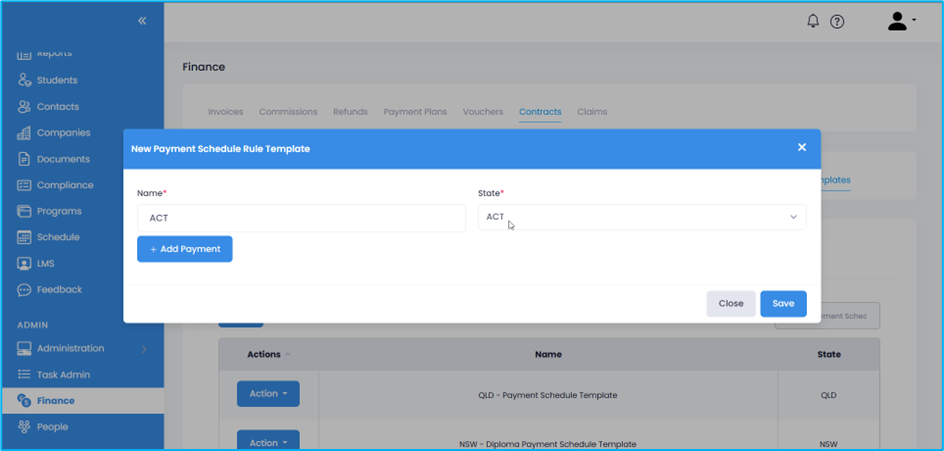
3. Add the following information:
- Payment Instalment – add a name for the payment instalment.
- Subsidy Percentage – add the subsidy percentage for the payment instalment.
- Program Type – select the programs that are included for this payment instalment.
- Rule – choose the appropriate rule for this payment instalment. Options are:
- At least N UoC is reported with any of the following UoC outcome codes
- At least N% of the total UoCs is reported with any of the following UoC outcome codes
- Every time N UoC is reported with any of the following UoC outcome codes
- Every time N% of the total UoCs is reported with any of the following UoC outcome codes
- Number – Indicate the corresponding number for the rule (where N is a number).
- Outcomes – Select all the applicable outcome codes that will receive this payment instalment.

NOTES:
- The Duplicate button will duplicate all the information in the payment instalment. Clicking +Add Payment will add blank payment instalment fields.
- Use the trash icon to delete a rule or payment instalment that is not needed.
4. Click the Save button to save the template or Close to exit without saving.
Above are the steps on How to Create a Payment Schedule Rule Template (ACT).
Congratulations on completing this tutorial. We hope this has been helpful to you and your organisation. For any questions or concerns regarding this function, please reach out to the contact support via email.